Disable Usage Tracking
Overview
Jira administrators can use the Disable Usage Tracking setting to stop QMetry Test Management for Jira from sending usage data to Amplitude and Segment. The setting applies across QMetry Test Management for Jira application, takes effect immediately when saved, and affects only QMetry Test Management for Jira usage data.
Note
You must have the Jira administrator role on your Jira Cloud site.
Default Behavior
Usage tracking is on by default for new installations and for existing sites after an upgrade. QMetry Test Management for Jira sends usage data until a Jira administrator turns the Disable Usage Tracking option on.
The toggle states work as follows:
Disable Usage Tracking toggle | Usage tracking | Amplitude and Segment analytics |
Off (default) | On | QTM4J loads the analytics libraries and sends usage events. |
On | Off | QTM4J does not load the analytics libraries and sends no usage events. The setting affects only usage analytics. All QTM4J features work as usual. |
Disable Usage Tracking
To stop QMetry Test Management for Jira from sending usage data to Amplitude and Segment, do the following:
In Jira, click the Settings icon and select Marketplace Apps.
On the navigation pane, click QMetry and select Global Settings.
On the QTM4J Global Settings page, go to the Privacy & Data section.
Turn on the Disable Usage Tracking toggle.
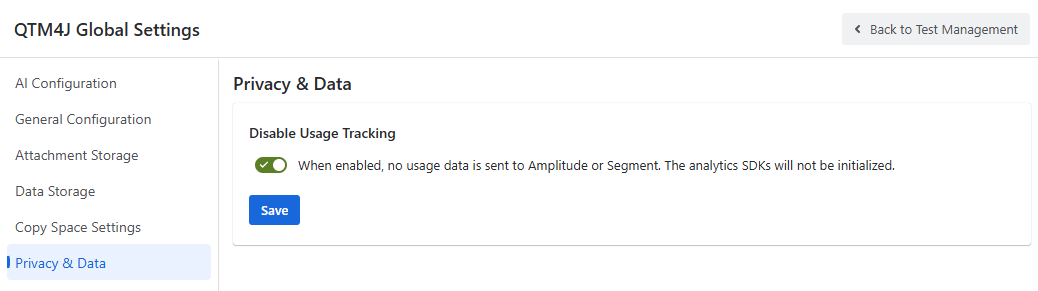
Click Save.
A confirmation message appears stating that usage tracking is disabled and that no data will be sent to Amplitude or Segment. The toggle shows the saved state each time you open the page.
Re-enable Usage Tracking
To resume sending QMetry Test Management for Jira usage data to Amplitude and Segment, do the following:
In Jira, click the Settings icon and select Marketplace Apps.
On the navigation pane, click QMetry and select Global Settings.
On the QTM4J Global Settings page, go to the Privacy & Data section.
Turn off the Disable Usage Tracking toggle.
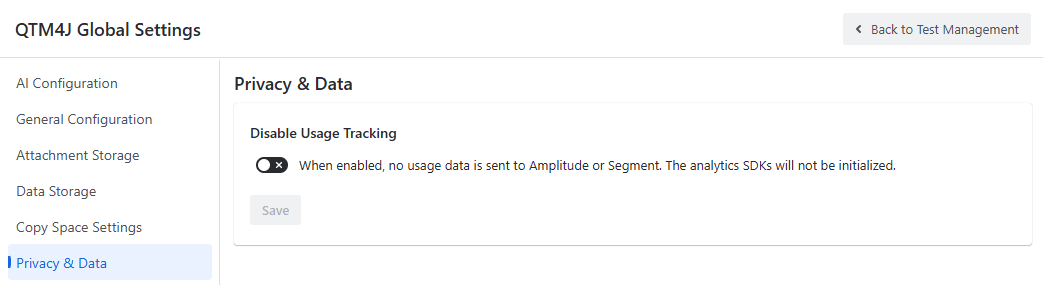
Click Save.
A confirmation message appears showing the new tracking state. QMetry Test Management for Jira loads the analytics libraries and resumes sending usage events the next time a user loads a page or interacts with the app.