Test Plan
A test plan can resemble a cycle, a release, or a sprint in your product development/project cycle. Test Plan in QMetry is a logical grouping of test cycles that are executed in a particular phase. It helps you schedule testing activities for your test project.
Test Plan provides real-time execution progress of test cycles and lets you gauge whether the testing process is in progress as per the drawn roadmap, and helps you control risk.
The Test Plan list view screen includes Execution Summary and Execution Summary (Tabular) columns displaying the consolidated execution status of all the associated test cycles. This allows users to monitor testing progress without navigating to the Test Cycles tab of individual test plans.
For example, the QA Manager wants to monitor the comprehensive overview of the test plan's execution progress for a Sprint and Version so that they can plan the testing activities further.
Note
The Execution Summary only displays the summary of the latest test executions.
You can show or hide the columns from the Columns option.
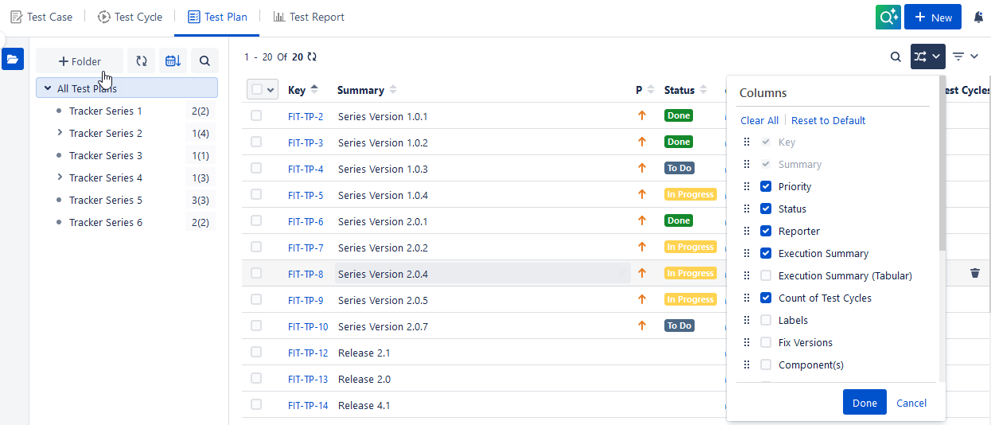
The Execution Summary and Execution Summary (Tabular) columns are displayed on the Test Plan list view.
The Execution Summary (Tabular) columns show the execution status with the count of test cases linked to the test plan.

Hovering over the Execution Summary shows the count of test cases and test cycles associated with the test plan.
Note
QMetry Test Management for Jira uses Jira’s native editor, and some characters, like backslashes, used in the wiki markup body, become unusable by default. This is a technical limitation of Jira. You can use the Code from the rich text editor to mention any text containing a backslash as a workaround.
View Consolidated Metrics
The Test Plan list view displays the following consolidated metrics for all test cycles associated with a test plan, so you can assess testing progress and health without opening individual Test Plans. The view includes the following key metrics:
Test Case Count
Defect Count
Estimated Time Required
Actual Time Spent
You can show or hide columns in the Test Plan list view. The system automatically saves your column selection in your user preferences.
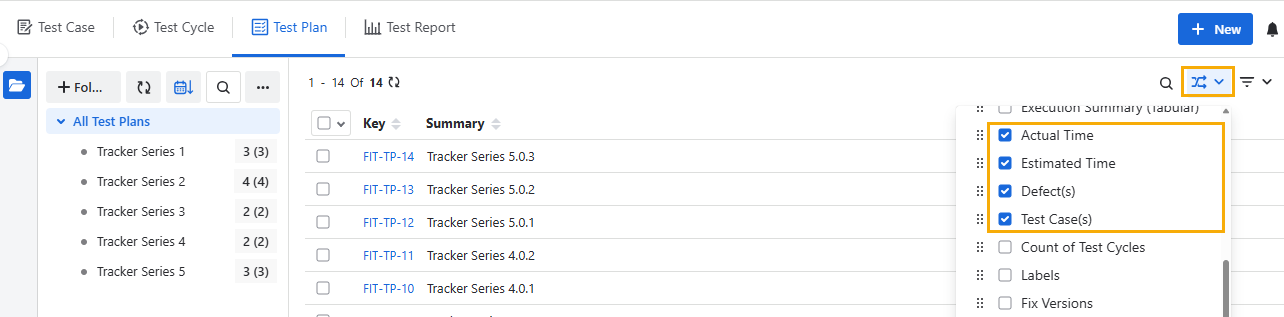
The system updates the metrics in real time as you run test cycles, log defects, and record actual time.
For a detailed view of these metrics, drill down in the Test Plan two-dimensional report. The drill-down view displays the consolidated metrics for all Test Cycles linked to that Test Plan.