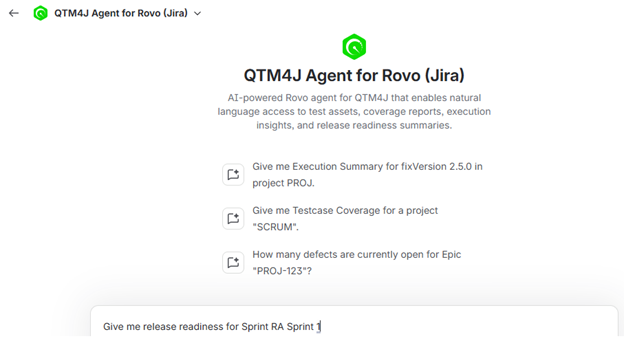
QTM4J Agent for Rovo
Atlassian Rovo is an AI-powered assistant that enables interaction with Jira data using natural language. It provides summarized insights, contextual analysis, and actionable information without requiring manual report generation.
The QTM4J Agent for Rovo extends this functionality to test management by integrating data from Jira and QMetry. It enables users to evaluate quality metrics, identify risks, and assess release readiness through conversational queries.
Capabilities
The QTM4J Agent for Rovo supports the following capabilities:
Test Coverage - Displays requirement-to-test coverage and identifies gaps that may impact quality.
Defect Analysis - Summarizes defect trends, severity distribution, and concentration areas.
Execution Trends - Shows execution status and progress across cycles, sprints, or releases.
Release Readiness - Aggregates quality indicators to evaluate whether a release meets defined criteria.
Ad-hoc Test Cycles - Generates test cycles dynamically based on query context.
These capabilities can be used together to refine queries and retrieve more detailed insights without switching between reports.
Note
Permission required: Access to QTM4J Agent for Rovo requires the Report View permission in QMetry. Returned data is limited to the user’s existing permissions.
Benefits
Using the QTM4J Agent for Rovo helps teams:
Identify potential release risks early
Detect gaps in test coverage and execution
Monitor defects that may impact release outcomes
Support data-driven decision-making
Accessing QTM4J Agent for Rovo
Perform the following steps to use QTM4J Agent for Rovo:
Click Ask Rovo from any Jira page (for example, a Jira Story page or a QTM4J page).
Click Rovo.
In the agent selector, search for “QTM4J” and select QTM4J Agent for Rovo.
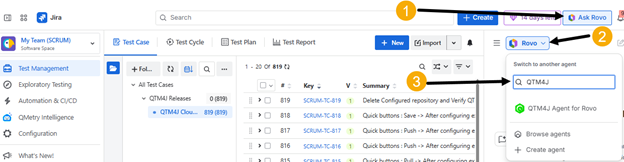
(Optional) Open the editor in full-screen mode for better visibility.
Enter queries in natural language.