Installation of QTM4J Bamboo Integration
QTM4J Bamboo Integration - DevOps/CD add-on is designed for QMetry Test Management for Jira.
Note
Prerequisites:
QMetry for JIRA Server/Cloud
Installed Bamboo Server
Installing QTM4J Bamboo Integration - DevOps/CD
You should be a Bamboo Administrator to install QTM4J Bamboo Integration - DevOps/CD. Make sure you have the latest version (2.2.4 or above) of the Universal Plugin Manager installed.
Perform the following steps to install QTM4J Bamboo Integration - DevOps/CD:
Log in to your Atlassian application instance as an admin.
Click the Cog icon list on the top menu bar and select Manage Apps. Then select Find New Apps on the navigation bar.
Locate QTM4J Bamboo Integration - DevOps/CD using search. Results include add-on versions compatible with your Atlassian application instance.
Click Install to download and install your add-on.
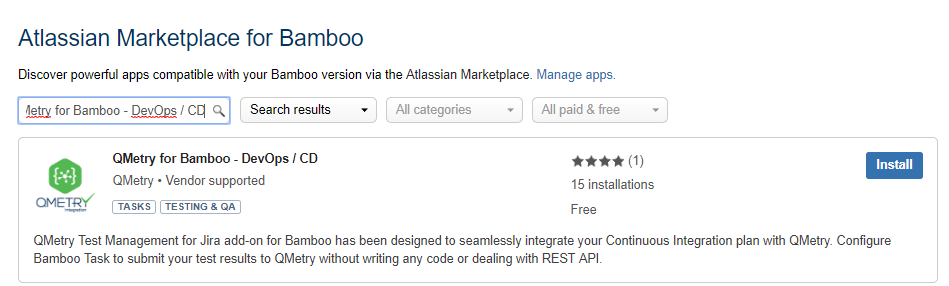
In the Installed and ready to go Installed and ready to go dialog, click Close.
Using QTM4J Bamboo Integration - DevOps/CD Plugin
Follow the links below as per your QTM4J Cloud instance.
Uninstall QTM4J Bamboo Integration - DevOps/CD
Perform the following steps to uninstall QTM4J Bamboo Integration - DevOps/CD:
Log in to your Atlassian application instance as an admin.
Click the Cog icon list on the top menu bar and select Manage Apps.
Locate the installed QTM4J Bamboo Integration - DevOps/CD. Search for the name in the list of installed apps if it is long.
Click Uninstall to uninstall the add-on.
Note
Uninstalling the app will permanently remove the current version of the app from Bamboo and your filesystem.
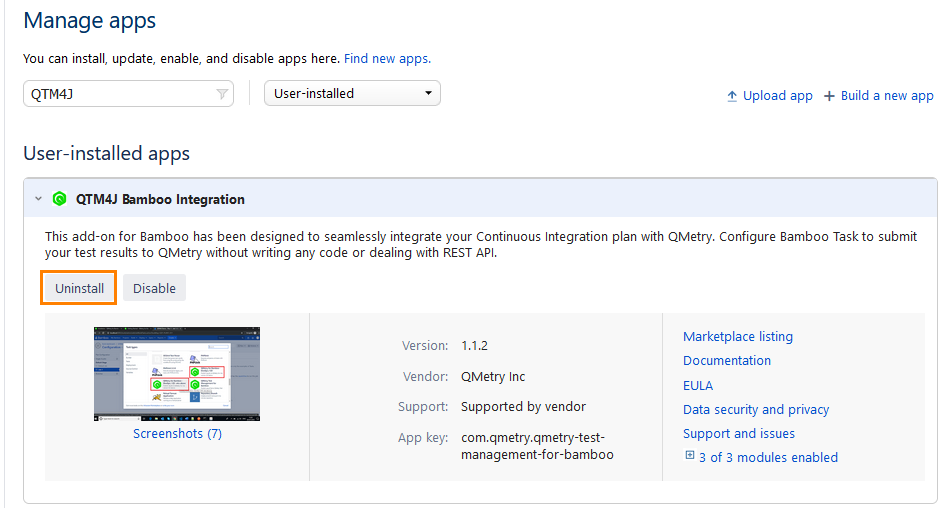
The confirmation message appears.
Click Uninstall app.